
Seeing different scores? Don’t worry 🙂
You may notice that your QVscribe Quality Analysis scores look a little different than before. That is expected and it is a good thing!
QVscribe has updated how the Quality Score is calculated so it better reflects how requirements improve during real-world writing and review. This update makes scores smoother, more predictable, and easier to use as a progress signal.
This updated scoring is available starting with:
-
QVscribe Office: v8.0
-
QVscribe for QTS: v8.0
-
QVscribe for QRAcloud: v9.0
Any analyses run in these versions or later will use the updated scoring model.
Importantly, this is not a change to your rules, standards, or problem types. The only adjustment is to how heavily Excessive Continuances is weighted (more on that below).
What changed
The update affects how issues add up into a score, not what QVscribe looks for.
With the new scoring approach:
- Scores are less abrupt and more gradual
- Small improvements are more likely to show up
- Iterative cleanup produces steadier progress
- Scores behave more consistently across documents
- More instances of the same issue now score worse than fewer, even at the low end. Previously, once a requirement had enough issues, additional ones stopped making a visible difference. Now, for example, five instances of ambiguous language will score lower than two, giving you a clearer signal even on your worst requirements.
You will generally see higher scores, especially for requirements that are improving but not yet perfect. For example, a requirement with no imperative or multiple imperatives previously scored 1 and now scores 3.0.
What did not change
Just as important, a lot stayed the same:
-
The same Problem Types are evaluated
-
Your configuration and glossary are unchanged, aside from the updated Excessive Continuances weighting
-
Higher scores still mean clearer, more testable requirements
-
Issues still need to be addressed and are reflected more proportionally
If a requirement had ambiguity or structure issues before, it still has them now.
Why we've made this change
Over time, we saw that the previous scoring approach could sometimes feel confusing:
- Early issues could drive scores very low
- Meaningful edits did not always move the score
- Small changes could sometimes cause large jumps
The updated scoring model smooths this out so the score better matches engineering judgment and writing progress.
What you might notice after the update
After the update, it is normal to see:
-
Fewer requirements clustered at the very bottom
-
More consistent score changes per edit. Fixing the last issue or two on a requirement will still move the score noticeably.
-
Clearer trends when reviewing progress over time
- Lower scores for requirements flagged for Excessive Continuances
We tightened how Excessive Continuances is weighted, so a lower score there is expected, not a sign that something's wrong.
This does not mean QVscribe is being more lenient. It means the score is doing a better job of showing how close a requirement is to high quality.
How to use the score going forward
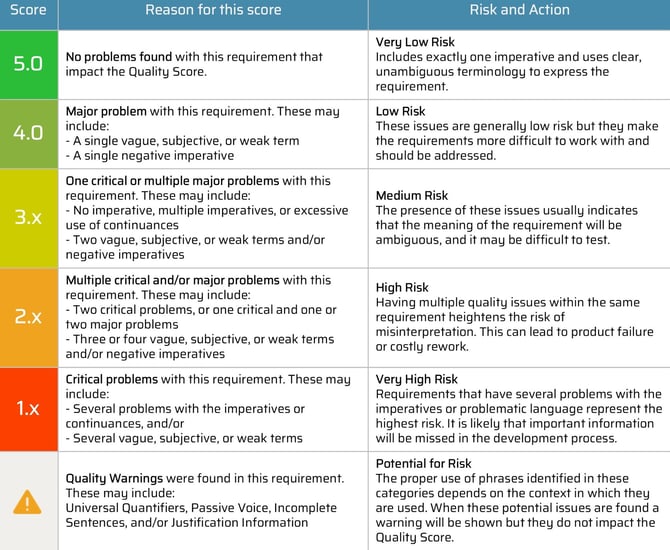
Quality Scores are shown as decimals from 1.0 to 5.0, rounded down to one decimal place (for example, 3.97 displays as 3.9). A requirement with no problems scores 5.0, one major problem scores 4.0, and one critical problem scores 3.0. Each additional problem lowers the score further, and the score gets closer to 1.0 as more problems are found.
Major problems: vague, subjective, or weak terms and negative imperatives.
Critical problems: no imperative, multiple imperatives, and excessive use of continuances.
The score distribution histogram still groups scores into whole-number bins by the first digit, so a 2.4 and a 2.9 both appear in bin 2.
Best practices have not changed:
-
Look at Problem Types first, score second
-
Use scores to prioritize, not to judge
-
Focus on trends, not single numbers
Snapshots and Timelines are especially helpful for seeing progress with the updated scoring.
Key takeaway
QVscribe’s updated scoring provides a clearer and steadier signal of requirement quality without changing your standards.
Same rules. Same intent. Better feedback.
👉 Want guidance on comparing historical scores, reviewing configurations, and setting a new baseline?
Check out Transitioning to the New QVscribe Scoring for step-by-step guidance on comparing results, evaluating configuration impact, and updating internal thresholds.