.png?width=75&height=75&name=4.0%20(7).png)
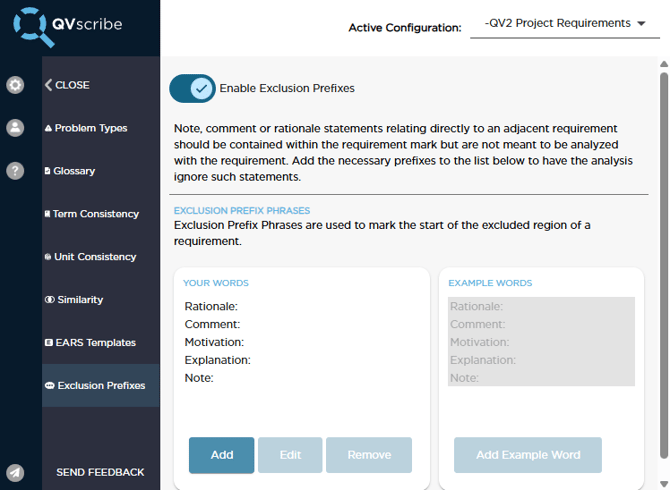
Exclusion Prefixes allow content to be ignored by QVscribe's analysis, such as notes or contextual information related to a requirement. This helps improve clarity while ensuring supporting text does not affect the requirement’s quality score.
By default, Exclusion Prefixes are disabled in the standard configurations and must be enabled by a Configuration Author or Administrator-level user.
How Exclusion Prefixes Work
Exclusion Prefixes ignore content that appears after an identified prefix.
For example:
The system will have indicator lights for when the system is activated, engaged, as well as the status of the cruise control.
Note: The indicator lights should be coloured green for activated or red for disengaged.
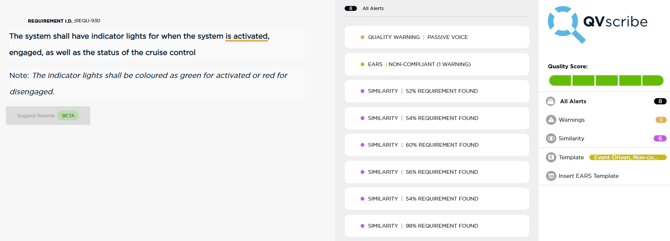
In this example:
-
The requirement text before the prefix will be analyzed by QVscribe.
-
The text following the prefix will be ignored and not included in the requirement score.
When Analysis Resumes
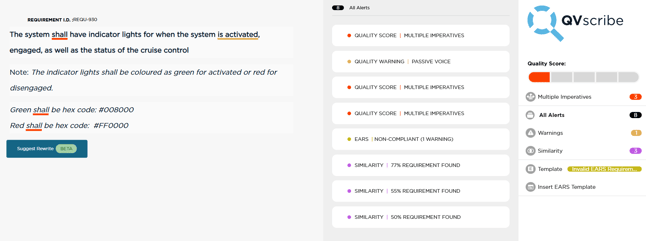
If additional text appears on new lines after the excluded content, QVscribe will resume analyzing that text.
For example:
The system will have indicator lights for when the system is activated, engaged, as well as the status of the cruise control.
Note: The indicator lights should be coloured green for activated or red for disengaged.
Green shall be hex code: #008000
Red shall be hex code: #FF0000
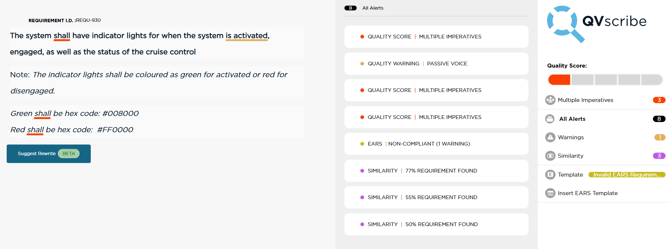
In this case:
-
The note text after the prefix is ignored
-
The lines following the note are analyzed again
Ignoring the Remainder of a Requirement with Line Breaks
If you want QVscribe to ignore all remaining text after the prefix, you can format the text so that the explanatory content appears after a line break.
For example:
The system will have indicator lights for when the system is activated, engaged, as well as the status of the cruise control.
Note:
The indicator lights should be coloured green for activated or red for disengaged.
Green shall be hex code: #008000
Red shall be hex code: #FF0000
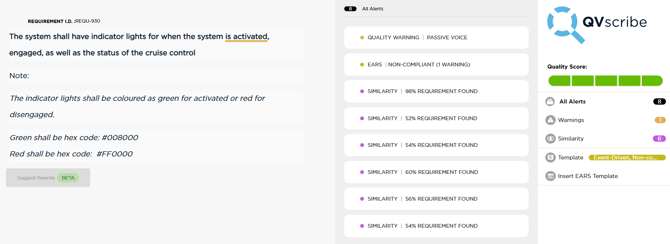
In this format, everything after the prefix can be excluded from analysis.
This is helpful when the remaining content contains extended explanations, formatting details, or supporting information that should not be evaluated as part of the requirement.
Ignoring the Remainder of a Requirement Regardless of Formatting
If formatting does not allow for clean line breaks, you can configure QVscribe to ignore all remaining text after a prefix by adding [~] before the prefix in the configuration.
Example configuration:
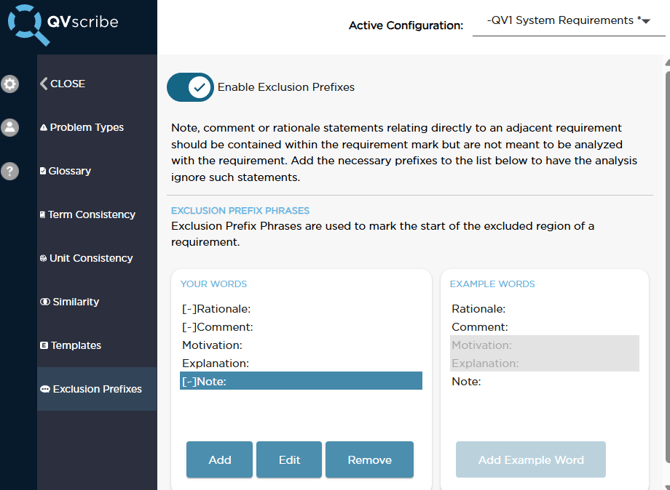
When [~] is used, QVscribe will ignore all lines following the prefix, regardless of formatting or line breaks.
This approach is useful when the remainder of the requirement contains extensive notes or supporting information that should always be excluded from analysis.
Reasons Why Exclusion Prefixes May Not Be Ignoring Content
If the prefix is not working as expected, check the following:
1. The prefix is not included in the active configuration
Ensure the prefix being used (for example "Note:" or "Rationale:") is present in the selected configuration.
2. Line breaks are not formatted correctly
If you are relying on line breaks to exclude content, ensure the prefix appears on its own line and is followed by a line break.
3. [~] is required for full exclusion
If you want QVscribe to ignore all content after the prefix regardless of formatting, add [~] before the prefix in the configuration.